🚀 Satisfied with how it went at #beconnectedday, I really enjoyed it. 🔍 Igor Macori and I explained the Search on Microsoft 365 from two different angles (full-text and AI-based), and the session was enjoyed by many people.
In this post, and in the above-linked video, I’ll give you an overview of all the new features of Copilot Studio announced during the just ended Microsoft Build 2025 conference, broken down by macro categories: multi-agent support, models, knowledge, tools, analytics, publishing, application lifecycle management.
Multi Agents
Multi-Agent Orchestration
Rather than relying on a single agent to do everything—or managing disconnected agents in silos—organizations can now build multi-agent systems in Copilot Studio, where agents delegate tasks to one another.
In the demo showed in my video, we have a banking agent that helps customers with their banking needs (for example checking account balances, transferring funds, report a stolen card and so on): previously you would have to build a single agent with all of these capabilities, now instead you can break a complex agent down into many connected agents each one specialized in a single functionality.
Adding a new agent is very easy: you can add an agent from Copilot Studio or the Microsoft 365 SDK, Microsoft Fabric, Azure AI Foundry. And in the future you’ll be able to connect to third party agents, via the A2A protocol.
Multilingual capability for Generative Orchestrator
Microsoft now provides a catalog of managed agents you can browse and install from within Copilot Studio. These agents are complete solutions, that you can use as template and customize for your needs.
Models
Copilot Tuning
A feature that was long-waited is Copilot Tuning. Copilot Tuning allows you to fine-tune large language models (LLMs) by using your own data. That’s implement in a task-specific fashion, let’s say in a controlled way, let’s see an example.
The first step is configuring your model. Click create new. Next, you’ll provide the model name, a description of the task you’d like to accomplish, and select a customization recipe tailored to the specific task type.
Next, you’ll give the model instructions to help it identify and prepare the most relevant data from your SharePoint sites.
Next, you need to provide the training data or knowledge, which forms the foundation of your fine tuned model. Currently only SharePoint sources are supported.
The final step in configuring is to define who can use the fine-tuned model to build agents in Microsoft 365 copilot by using security groups.
Now that your model is configured, you’re ready to prepare your training data with data labeling. Data labeling is the process of identifying the best examples that you want the model to learn from.
Once your data are processed, you’ll receive an email notification indicating that your data is ready for labelling.
The model you have fine-tuned can be used in M365 Copilot Agent Builder. So from the new M365 Copilot interface you select Create Agent, and you’ll be prompted to select the purpose of your agent: general purpose or task-specific. Select task specific to see the list of fine-tuned models that are available to you. You select a model, then from now on you proceed to building and customize your agent as usual.
Bring Your Own Model as a primary response model
We are now offered the possibility to fine-tune the LLM model used by Copilot Studio while building our agents, in two different ways: at agent level and at tool level. Let’s start with the agent level.
Once you have your agent initialized, go to the settings, in the generative AI tab, you have now a drop down to change the primary response model: you have some preset options plus the possibility to connect to AI Foundry and select your own published models from AI Foundry.
Bring Your Own Model as a primary response model
The second way how you can introduce a fine-tuned model in our Copilot Studio agents is via the prompt tool.
The prompt tool allows you to specify a task to be completed by Copilot Studio, describing it in natural language, and copilot studio will call it when it reckons necessary.
Now you have the possibility to specify a model for your prompt. You have some of the managed models already available for you, the ones that are curated by Microsoft. In addition it’s also possible to use one of 1900 plus Azure AI Foundry models based on your specific use case.
Knowledge
SharePoint lists, Knowledge Instructions
Copilot Studio is making progress on the Knowledge management as well. Now it supports SharePoint Lists, as well as uploading files grouping them together as a single knowledge base. Plus, now you have the option to write Instructions at knowledge level.
Tools
Computer Use
I think Computer Use is by far the most impressive tool added to Copilot Studio. Unfortunately it’s going to be available only for big customers in USA, at least for now.
Computer Use allows Copilot Studio Agents to interact with desktop apps and websites like a person would—clicking buttons, navigating menus, typing in fields, and adapting automatically as the interface changes. This opens the door to automating complex, user interface (UI)-based tasks like data entry, invoice processing, with built-in reasoning and full visibility into every step.
Dataverse Functions
You have also Dataverse Functions in preview, you can create one from the Power Apps portal, the function can have inputs and outputs and a formula containing your business logic: and then you can add that function to your agent selecting the Dataverse connector and choosing Unbounded Action.
You can configure it with the appropriate inputs and outputs, and then that becomes one more tool at your agent disposal.
Intelligent Approvals in Agent Flows
Agent Flows is a new tool we have been seeing for few weeks now, Microsoft is actively working on it and at the Build Conference they presented Intelligent Approvals.
Intelligent Approvals inserts an AI-powered decision-making stage directly within the Advanced Approval action. You simply provide natural language business rules and select your desired AI model: the model then evaluates submitted materials—images, documents, databases, or knowledge articles—to deliver a transparent approve or reject decision, complete with a detailed rationale.
Analytics
Evaluation Capabilities
The challenge in building any kind of agent is making sure it responds accurately when users ask different types of questions.
This is where the new evaluation capabilities in Copilot Studio come in. Now you can run automated tests against your agent directly from the testing panel. You can upload your set of questions, import queries from the chat history or even generate questions using AI. You can review and edit each question before running the test. Then you can run the evaluation and get a visual summary of the evaluation results.
Publishing
Publishing to WhatsApp and SharePoint
You can now publish your agent to WhatsApp and, more importantly, you can publish it to SharePoint! That’s another long-waited feature, because so far it wasn’t possible to have a SharePoint Agent with actions and other advanced features, now finally you can.
Let me just point out here that if you create your SharePoint Agent from SharePoint, you can’t customize it in Copilot Studio yet. So this works only if you start from Copilot Studio and then publish to SharePoint, the vice versa is not possible yet.
Code Interpreter
Generate a chart via Python code
Copilot Studio agents can now generate charts, and that’s done using the new Code Interpreter feature. Python code is generated automatically in reply to a prompt, you can see it and reuse it, and then it executes and generates the chart as the user’s answer.
ALM
Source code integration
With native source control integration you can take your agents in your environment and connect it to a source control repository, such as Azure DevOps, and make commits from the UI directly, so that everything you do is source controlled and is managed in the same way that you would expect any software to be managed.
Edit agent in VS Code
And finally, for the real nerds, the extension to Visual Studio Code allows you to clone agents to your machine locally and start editing the code behind it!
You’ll get here syntax errors highlighting, auto complete, documentation and so forth.
In my video below we’ll look at something that’s currently still unseen: we’re going to use the MCP SDK for C# and .NET to build an MCP server that leverages Google search, and we’ll exploit it in an AI agent created with Copilot Studio!
Model Context Protocol, MCP, the new open-source standard that organizes how AI agents interact with external data and systems.
In this post we will see how MCP works, what it is, how it is applied and what its current limitations are. Watch my video here above for a further practical example of an MCP server coded in C# and .NET.
Let’s imagine we want to connect four smartphones to our computer to access their data: until some time ago, I would have needed four different cables with different connectors and maybe even four USB ports.
The solution
Then the USB-C standard came along and sorted everything out: now I only need one type of cable, one type of port, one charger, and I can connect and charge phones of any brand.
So, think of MCP as the USB-C for AI agents:
MCP standardizes the way AI agents can connect to data, tools, and external systems. The idea, which isn’t all that original, is to replace the plethora of custom integration methods—each API or data source having its own custom access method—with a single, consistent interface.
According to MCP specifications, an MCP server exposes standard operations, lists what it offers in a standardized manner, and can perform an action when an AI agent, the MCP client, requests it. On the client side, the AI agent reads what the server has to offer, understands the description, parameters, and the meaning of the parameters, and thus knows if and when it is useful to call the server and how to call it.
Here, if you think about it, it’s really a stroke of genius—simple yet powerful. On one side, I have a standard interface, and on the other side, I have an LLM that learns the server’s intents from the standard interface and thus understands if and when to use it. And all of this can even work automatically, without human intervention.
The MCP protocol
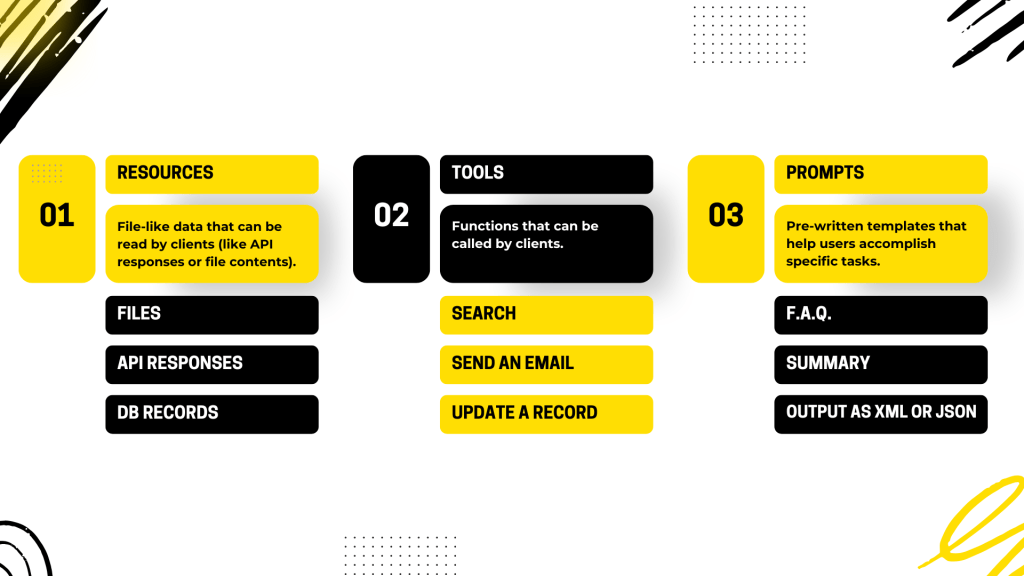
So, let’s get a bit practical. MCP helps us standardize three things, fundamentally:
Resources.
Tools.
Prompts.
Resources
An MCP server can provide resources to calling agents, and by resources, we mean context or knowledge base. For example, we can have an MCP server that encapsulates your database or a set of documents, and any AI agent can query your MCP server and obtain documents relevant to a prompt requested by its user. The brilliance here lies in having completely decoupled everything, meaning the MCP server has no knowledge of who is calling it, and AI agents use MCP servers without having hardcoded links or parameters in their own code.
Tools
Tools are simply functions that the MCP server exposes on its interface, nothing more, nothing less, and that AI agents can call.
Prompts
Prompts, finally, allow MCP servers to define reusable prompt templates and workflows, which AI agents can then present to users, as well as to the internal LLMs of the agent itself, to interact with the MCP server.
MCP marketplaces
The MCP standard was proposed by Anthropic last November, and within a few months, it has literally taken off. There are already numerous implementations of MCP servers scattered across the internet, covering practically everything. So, you can really go wild creating all sorts of AI agents simply by integrating these servers into your projects.
To facilitate the search for these MCP servers, some marketplaces have also emerged, and I mention the most important ones in this slide. I’ve counted five so far:
I would say the most comprehensive ones at the moment are the first two, MCP.so and MCPServers.org. However, it’s possible that Anthropic might decide to release its official marketplace in the near future.
Areas of improvement
We have seen how MCP is a very promising standard, but what are its weaknesses? If there are any. Well, there are a few at the moment, but that’s understandable since it’s a fairly young standard. Very young, I would say. Currently, the biggest limitation is the lack of a standard authentication and authorization mechanism between client and server.
Work is being done on it. The idea is to integrate OAuth 2.0 and 2.1. Another significant shortcoming is that there is currently no proper discovery protocol for the various MCP servers scattered across the network. Yes, we’ve seen that there are marketplaces, but if I wanted to allow my AI agent to perform discovery completely autonomously, to find the tools it needs on its own, well, that’s not possible yet.
We know that Anthropic is working on it. There will be a global registry sooner or later, and when it finally becomes available, we will definitely see another significant boost in the adoption of this protocol. Additionally, the ability to do tracing and debugging is missing, and that’s no small matter. Imagine, for example, that our AI agent calling these MCP servers encounters an error or something doesn’t go as expected:
What do we do? Currently, from the caller’s perspective, MCP servers are black boxes. If something goes wrong, it’s impossible for us to understand what’s happening. There’s also no standard for sequential calls and for resuming a workflow that might have been interrupted halfway due to an error.
For example, I have an AI agent that needs to make 10 calls to various MCP tools, and I encounter an error on the fifth call. What do I do? The management of the retry resume state is entirely the client’s responsibility, and there is no standard; everyone implements it in their own way. So, MCP is still young and has significant limitations. However, it is developed and promoted by Anthropic, has been well-received by the community, adopted by Microsoft, and also by Google, albeit with some reservations in this case.
Conclusions
So, I would say that the potential to become a de facto standard is definitely there, and it’s certainly worth spending time to study and adopt it in our AI agents.
Subscribe to my blog and YouTube channel for more ☺️
Are you ready to unlock the full potential of Copilot Studio? Dive into my YouTube playlist he below where you’ll discover how easy it is to create an AI Agent with Copilot Studio, add topics and actions to it, and publish it to Teams.
25 years of lessons learned in my career, summarised in 10 practical tips.
This video and blog post are a re-run of a speech I gave at the Northern Ireland Developers Conference in 2023.
25 years of lessons learned in my career, summarised in 10 practical tips. This video and blog post are a re-run of a speech I gave at the Northern Ireland Developers Conference in 2023.
#1: Be resilient. Take Risks.And get out of your comfort zone!
25 years ago, I had been living in L’Aquila, known as “the coldest city in Italy“, a place that I never liked. I was attending a university that I never liked and studying subjects that didn’t interest me, all because, unfortunately, my parents couldn’t afford to send me to study where I truly dreamed of.
I was spiraling into depression.
Then, one day, I came across an advertisement in a newspaper. They were looking for internship developers in Rome. With just a little pocket money, I made the decision to hop on a bus, move to Rome, and leave everything behind.
This marked the beginning of my career in IT.
Years later, I became an entrepreneur and founded a startup. The business was thriving, but I felt unsatisfied with the Italian IT scene.
One fine day, I made the choice to pack my car and leave everything behind once again, this time moving to Ireland. At that point, I was already 40 years old, had never worked abroad, and my English was far from perfect (well, to be honest, it still isn’t). However, despite all these challenges, my career took great leaps, thanks to those daring decisions.
And here’s my first piece of advice: Be resilient. Take risks in life. Step out of your comfort zone.
#2: Good things take time.
I started my career by writing a small piece of code in JavaScript. Now, I lead a practice in a company that has just won the Microsoft Country Partner of the Year award in Ireland.
It definitely took some time to get to where I am now, and I’m not finished yet. Could I have done better or faster? Probably, yes.
Can other people do better than me and get there faster than me? Of course!
However, we can’t deny a fact: talent is not enough. To reach certain roles, seniority and experience are also needed, and unfortunately, these are things we can’t learn in books or be trained for.
Building a successful IT career is a journey that requires patience and persistence.
#3: Build your foundation first, specialise later.
Throughout all these years, I’ve always been focused exclusively on Microsoft technologies. I’ve witnessed the evolution of nearly all their products over time, starting with .NET in the early 2000s, and now including Microsoft 365, Azure, AI, and related technologies.
Of course, 25 years ago, I couldn’t have predicted that I’d be working with what I am today. I can’t deny that this can create a somewhat unsettling feeling, you know, that sense of, “Am I at risk of becoming obsolete? What if I’m ever made redundant? Should I consider changing my job?“…
So, the way I’ve dealt with this is by telling myself, “Okay, Donald, regardless of the skills that are currently in demand or might be in the future, there are certain things that never change“…
For instance, principles like object-oriented programming, effective project management, application development methodologies (whether it’s a three-tier architecture, a service-oriented application, a distributed system, a web application, or a mobile app), and so on.
In the beginning, I strived to excel in various roles and focused on mastering these foundational concepts. Then, at a certain point, I began to specialize in one or two areas that I believed would provide job security for the coming years. Needless to say, one must also have the ability to discern the significant technological trends. For example, AI appears to be a highly promising trend, but, in my opinion, the same level of optimism may not be warranted for concepts like the Metaverse or Blockchain…
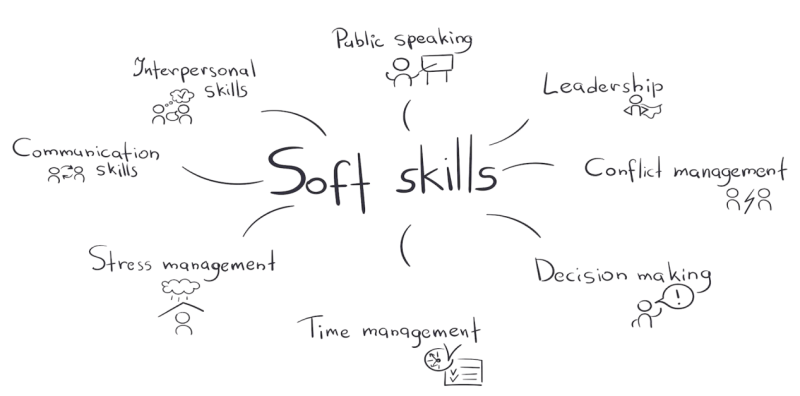
#4: Soft Skills, Soft Skills, Soft Skills.
Technical skills are undoubtedly important, but soft skills like communication, teamwork, adaptability, and problem-solving are equally crucial. In fact, I’d argue that they are vital if you want to thrive in this world for the long haul.
You don’t need to be an extrovert (I’m actually an introvert myself), and you don’t have to possess the oratory skills of a politician (I certainly don’t, even in my native language). However, being able to effectively communicate your ideas, thoughts, or even disagreements can significantly impact the success of a project and, ultimately, how you’re perceived by others.
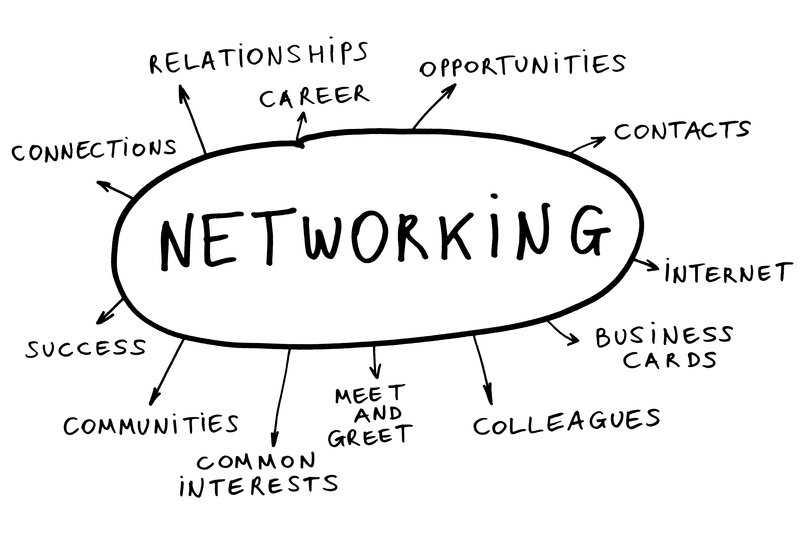
#5: Networking.
Networking is crucial. Building a robust professional network can open doors to valuable connections, job opportunities, and new collaborations.
When I relocated from Italy to Ireland, I owe my success to the people already established there. All my job opportunities either stemmed from people I knew or individuals who reached out to me on LinkedIn. Most of the people I’ve hired were either endorsed or referred through my network.
So, dedicate time and effort to attend events, engage in online forums, participate in local meetups, and cultivate your LinkedIn network.
#6: Know your emotions. And learn to manage them.
Stress and emotions are constants in this job. Even at my age, I’m still learning how to manage my emotions. Emotional intelligence is vital in the field of IT. It helps you handle stress, navigate workplace relationships, and effectively manage high-pressure situations. Developing emotional intelligence can lead to improved teamwork and career advancement.
How have I fared in this regard? Well, in the past, not very well. I made many mistakes – really quite a few. I did things I shouldn’t have done and said things I shouldn’t have said. Many times, I neglected to pay attention to my emotions in the workplace, and as a result, I damaged many relationships, missed numerous opportunities, and, ultimately, I could have been in a much better position than I am now.
Reflecting on my experiences and the path I’ve taken, I can confidently say that developing emotional intelligence is perhaps the most significant investment one can make to enhance their career. “Know your emotions and learn to manage them” is arguably the most important piece of advice I can offer in this post.
#7: “Perception is Reality”.
You can be a geek or a nerd, and that’s perfectly fine. However, if you want to thrive in this world, please strive to be a well-mannered geek ). Our jobs involve numerous meetings and various situations where you might encounter people for the first time. And unfortunately, it only takes about 10 seconds for someone to form their initial impression of you.
“Perception is Reality”
One of my former clients
So, if you’re aiming for success in your career, don’t forget the importance of the dress code, offer a firm handshake when meeting someone new, and communicate clearly.
“How you dress teaches people how to treat you”
Mum
#8: Performance is not enough.
Are you dreaming about that promotion? Or what about that pay rise?
Do you understand what it takes to achieve these goals? Perhaps exceptional performance comes to mind. Indeed, exceptional performance is what every employer expects from you by default.
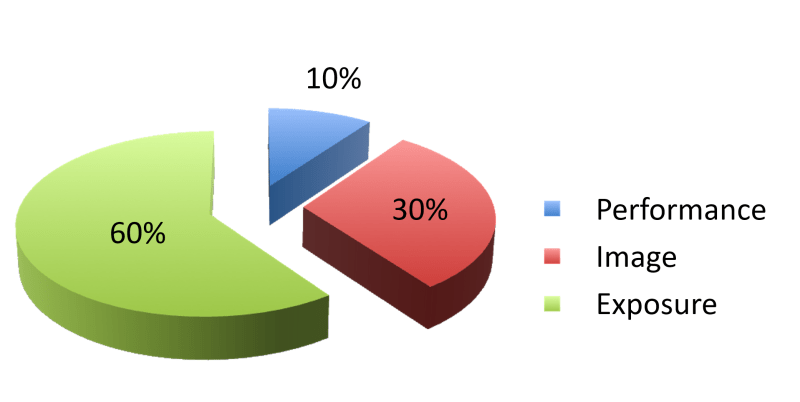
However, did you know that a great performance only accounts for 10% of the employer’s decisional process?
Image and Exposure make up the remaining 90%.
So, work on developing your image. As just said, “Perception is Reality“. Furthermore, manage your exposure by ensuring you are visible to the right people, in the right manner, and at the right time.
Advocating for your worth is crucial. Learn to articulate your achievements, contributions, and the value you bring to your organization.
If you have the opportunity to lead an important meeting or event, take full advantage of it. Prepare yourself accordingly. Write valuable content for a blog, conduct lunch & learn sessions for your colleagues, assist your company in delivering online webinars, showcase your expertise on LinkedIn.
Remember the PIE: Performance, Image, Exposure.
Additionally, research industry salary standards to better prepare yourself for negotiating a fair compensation package.
#9: Use AI to your advantage.
We often hear frightening stories about AI, such as its potential to take over our jobs and even control our lives ).
Personally, I had been disregarding ChatGPT for quite some time. However, a few months ago, I watched a presentation by a colleague on how Generative AI can enhance our day-to-day work. From that moment on, I fell in love with AI!.
AI tools can help automate routine tasks, analyze data more efficiently, and provide insights that can drive better decision-making. Understanding AI and its applications can give you a competitive edge in the IT industry.
So, instead of being afraid of AI, embrace it and use it to your advantage!
#10: Don’t settle. Keep learning. Keep going.
We are lucky to be IT experts. I believe that working in IT is one of the best professions one can have. The IT landscape is constantly evolving, and IT jobs are among the highest-paying positions in the world. You never get bored, as there is always something new to learn, new people to meet, and new experiences to gain.
It’s certainly not the easiest job; you need to continuously learn, look ahead, and adapt to avoid becoming obsolete.
So, don’t settle – keep learning, keep improving your skills and your mindset, and keep looking for better opportunities.
In recent years, Large Language Models (LLM) have dominated the field of generative artificial intelligence. However, new limitations and challenges are emerging that require an innovative approach. Meta has recently introduced a new architecture called Large Concept Models (LCM), which promises to overcome these limitations and revolutionise the way AI processes and generates content.
In recent years, Large Language Models (LLM) have dominated the field of generative artificial intelligence. However, new limitations and challenges are emerging that require an innovative approach. Meta has recently introduced a new architecture called Large Concept Models (LCM), which promises to overcome these limitations and revolutionise the way AI processes and generates content.
Limitations of LLMs
LLMs, such as ChatGPT, Claude, Gemini etc. need huge amounts of data for training and consume a significant amount of energy. Furthermore, their ability to scale is limited by the availability of new data and increasing computational complexity. These models operate at the token level, which means they process input and generate output based on single word parts, making reasoning at more abstract levels difficult.
Introduction to Large Concept Models (LCM)
Large Concept Models represent a new paradigm in the architecture of AI models: instead of working on the level of tokens, LCMs work on the level of concepts. This approach is inspired by the way we humans process information, working on different levels of abstraction and concepts rather than single words.
How LCMs work
LCMs use an embedding model called SONAR, which supports up to 200 languages and can process both text and audio. SONAR transforms sentences and speech into vectors representing abstract concepts. These concepts are independent of language and mode, allowing for greater flexibility and generalisation capabilities.
Advantages of LCMs
Multi-modality and Multilingualism
LCMs are language and mode agnostic, which means they can process and generate content in different languages and formats (text, audio, images, video) without the need for re-training. This makes them extremely versatile and powerful.
Computational Efficiency
Since LCMs operate at the concept level, they can handle very long inputs and outputs more efficiently than LLMs. This significantly reduces energy consumption and the need for computational resources.
Zero-Shot generalisation
LCMs show an unprecedented zero-shot generalisation capability, being able to perform new tasks without the need for specific training examples. This makes them extremely adaptable to new contexts and applications.
Challenges and Future Perspectives
Despite promising results, LCMs still present some challenges. Sentence prediction is more complex than token prediction, and there is more ambiguity in determining the next sentence in a long context. However, continued research and optimisation of these architectures could lead to further improvements and innovative applications.
Conclusions
Large Concept Models represent a significant step forward in the field of artificial intelligence. With their ability to operate at the concept level, multimodality and multilingualism, and increased computational efficiency, LCMs have the potential to revolutionise the way AI processes and generates content. It will be interesting to see how this technology will develop and what new possibilities it will open up in the future of AI.
A customer asked me a question about SharePoint Agents that I was unable to answer. Having then realised that perhaps SharePoint Agents are less trivial than I thought, I decided to take the question head-on, doing some tests to see if there was an answer that makes sense.
A few days ago I wrote an article on the Copilot Agents (you can find it here), and as you can see from reading it, I relegated the SharePoint Agents to the end, giving them just a standard paragraph that in truth adds nothing to what we have already known for a while.
But then it happened that during a demo the other day, a customer asked me a question about SharePoint Agents that I was unable to answer. Having then realised that perhaps SharePoint Agents are less trivial than I thought, I decided to take the question head-on that afternoon, doing some tests to see if there was an answer that makes sense.
This article is the result of those thoughts, and assumes a basic knowledge of SharePoint Agents.
The question
The customer’s question was: ‘Having one agent per SharePoint site seems excessive and unmanageable to me, how can I instead create my own “official” agent once, and make it the default agent for all SharePoint sites?’.
Let’s try to give an answer
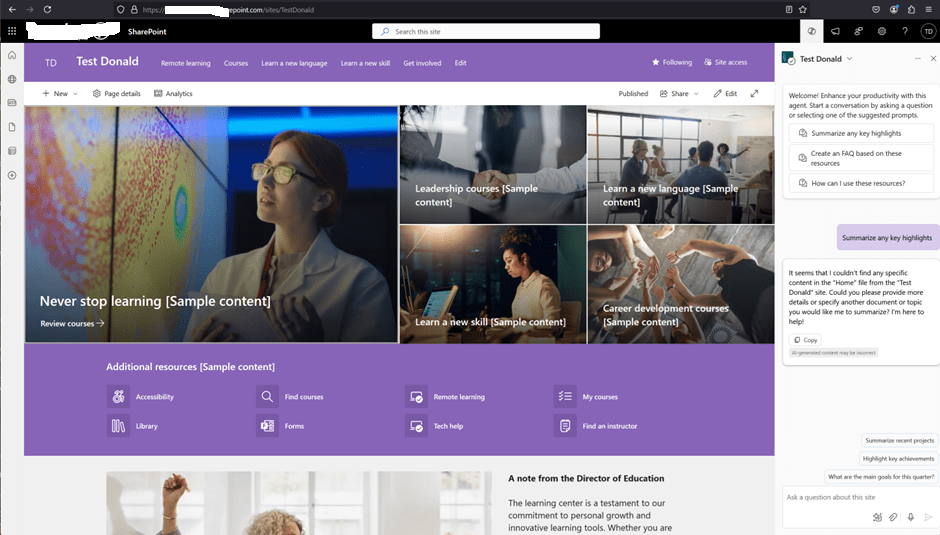
I created a test site, called “Test Donald“:
The site collection has its own default SharePoint Agent, having the same name as the site. This default agent does not have a corresponding .agent file in the site. Nor is there an option to edit the default agent. As we already know, however, I can create more agents, therefore I created a second one:
The new agent can be created directly from the menu, or by selecting a library or documents in a library:
(there must be at least 1 document in the library, otherwise the ‘Create an agent’ button won’t appear).
Please note that it is not (yet) possible to customise a SharePoint Agent in Copilot Studio:
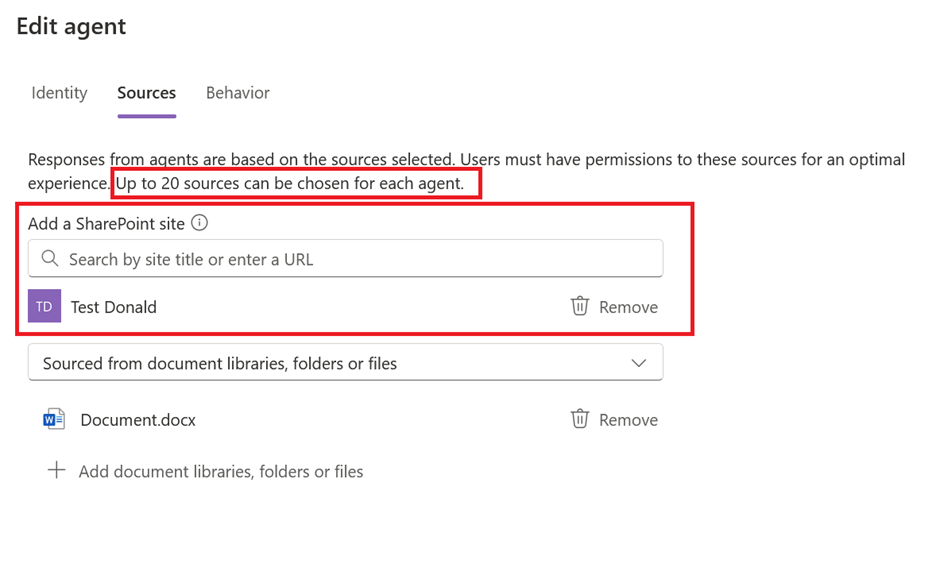
A SharePoint Agent published on one site can also be based on knowledge from other SharePoint sites, but it’s important to bear in mind that only a maximum of 20 knowledge sources can be added:
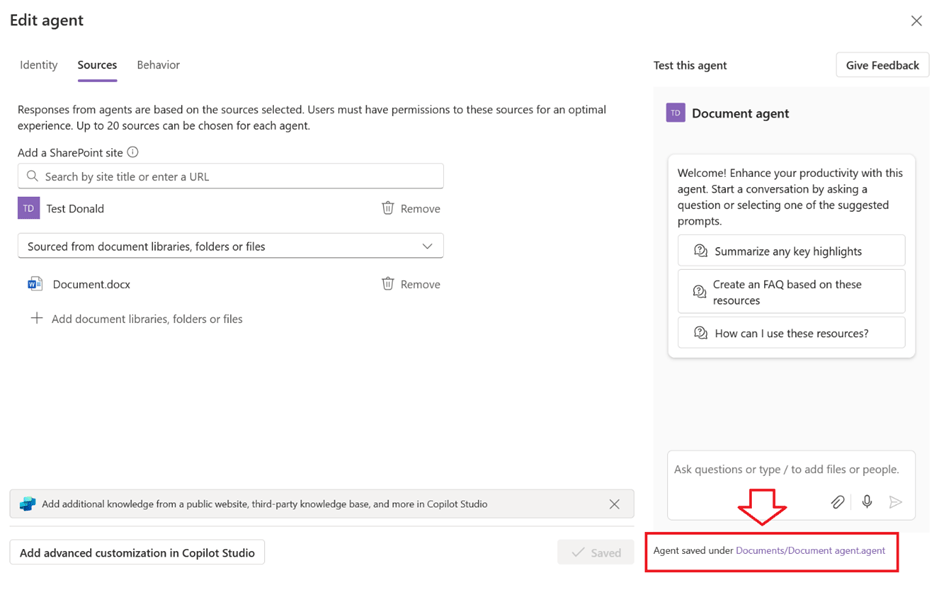
The Edit popup shows the location of the saved agent:
Navigating the link will lead to the location of the associated .agent file:
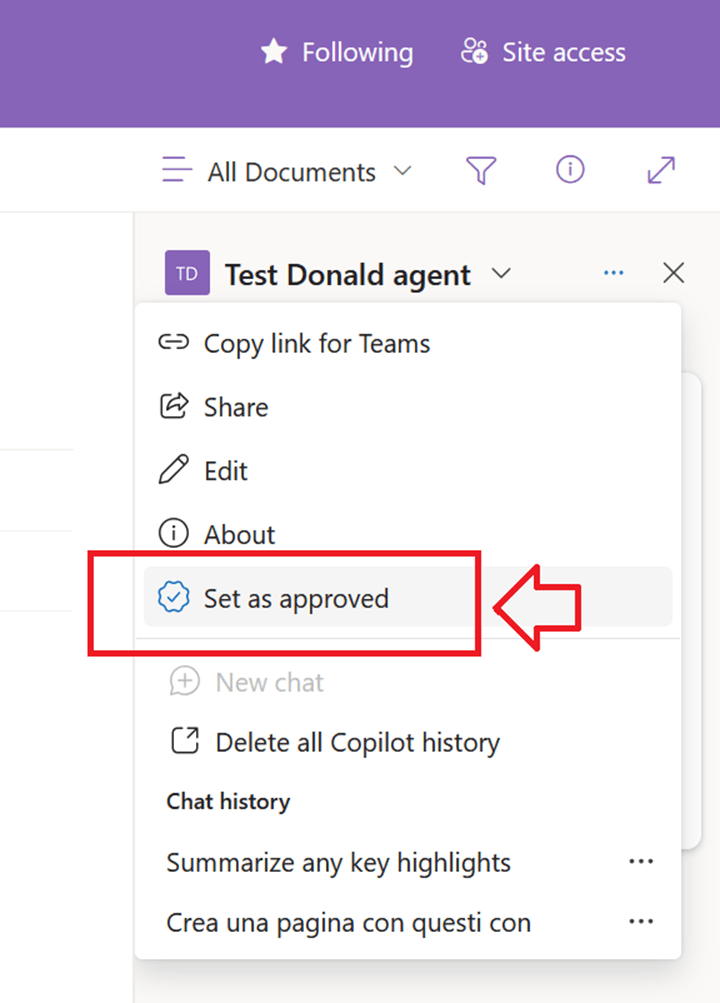
The new agent thus created is Personal and as such only accessible by the user who created it. When the site owner approves it, it becomes Published (Approved) at the site level and therefore accessible to the other (licensed) users of the site:
Once the agent has been approved, the relevant file is physically moved automatically by SharePoint to Site Assets > Copilots > Approved:
The newly approved agent can now be set as the site’s default agent:
There can only be one default agent for any given site:
Back to the question, then: can I configure a SharePoint Agent once and then have it as the site default agent on all sites?
To answer the question, I have created a second site collection called ‘Test Donald 2’, thus a Documents Agent 2, which has both sites (Test Donald and Test Donald 2) as sources:
I then saved it, approved it, and set it as the default for Test Donald 2:
The next step then was to copy the relevant .agent file from Test Donald 2 to Test Donald:
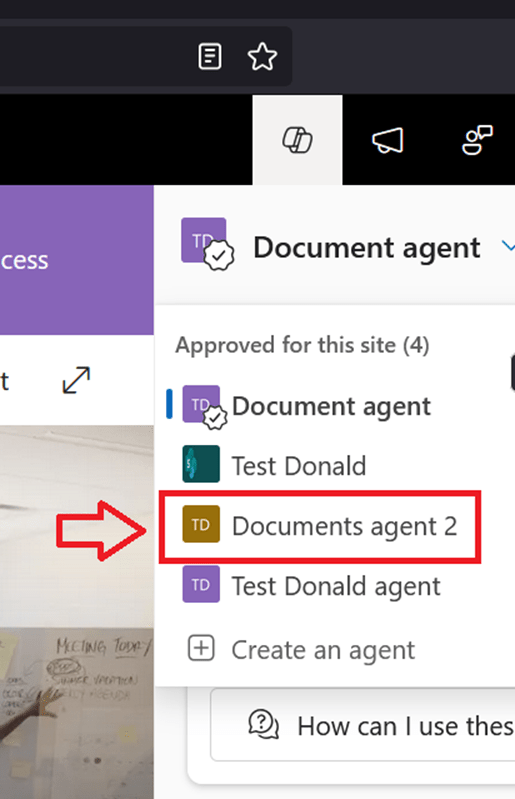
The agent just copied appears correctly in the list as an approved agent on the Test Donald site:
And it is also possible to select it and set it as site default agent:
Conclusions
The answer then is Yes, you can have a default agent that is always the same on all SharePoint sites, provided you accept the following limitations:
20-source limitation (inherent limitation of SharePoint Agents, at least for now).
Customisation in Copilot Studio not yet available.
Manual copying of the .agent file and manual approval as default agent.
The copying of the .agent file could be automated with a Power Automate flow associated with a provisioning process. However, approving it as the default agent currently is not possible via API.




















 Donald Mucci