Messing around with SharePoint Agents

A customer asked me a question about SharePoint Agents that I was unable to answer. Having then realised that perhaps SharePoint Agents are less trivial than I thought, I decided to take the question head-on, doing some tests to see if there was an answer that makes sense.

A few days ago I wrote an article on the Copilot Agents (you can find it here), and as you can see from reading it, I relegated the SharePoint Agents to the end, giving them just a standard paragraph that in truth adds nothing to what we have already known for a while.

But then it happened that during a demo the other day, a customer asked me a question about SharePoint Agents that I was unable to answer. Having then realised that perhaps SharePoint Agents are less trivial than I thought, I decided to take the question head-on that afternoon, doing some tests to see if there was an answer that makes sense.

This article is the result of those thoughts, and assumes a basic knowledge of SharePoint Agents.

The question

The customer’s question was: ‘Having one agent per SharePoint site seems excessive and unmanageable to me, how can I instead create my own “official” agent once, and make it the default agent for all SharePoint sites?’.

Let’s try to give an answer

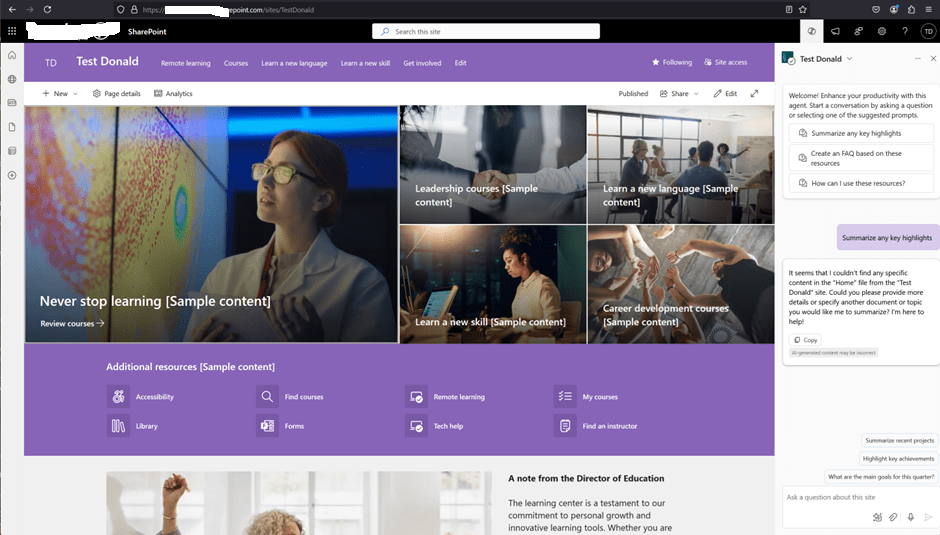
I created a test site, called “Test Donald“:

The site collection has its own default SharePoint Agent, having the same name as the site. This default agent does not have a corresponding .agent file in the site. Nor is there an option to edit the default agent. As we already know, however, I can create more agents, therefore I created a second one:

The new agent can be created directly from the menu, or by selecting a library or documents in a library:

(there must be at least 1 document in the library, otherwise the ‘Create an agent’ button won’t appear).

Please note that it is not (yet) possible to customise a SharePoint Agent in Copilot Studio:

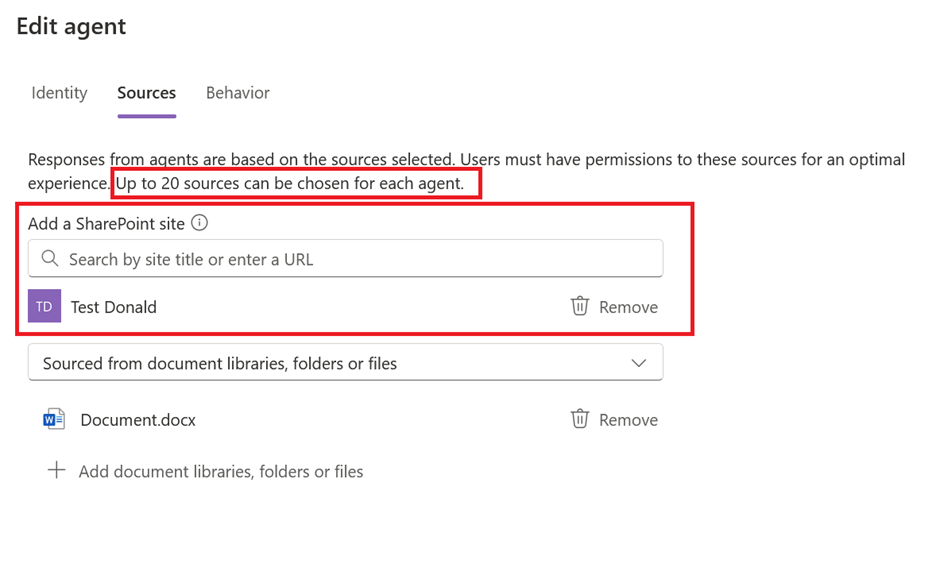
A SharePoint Agent published on one site can also be based on knowledge from other SharePoint sites, but it’s important to bear in mind that only a maximum of 20 knowledge sources can be added:

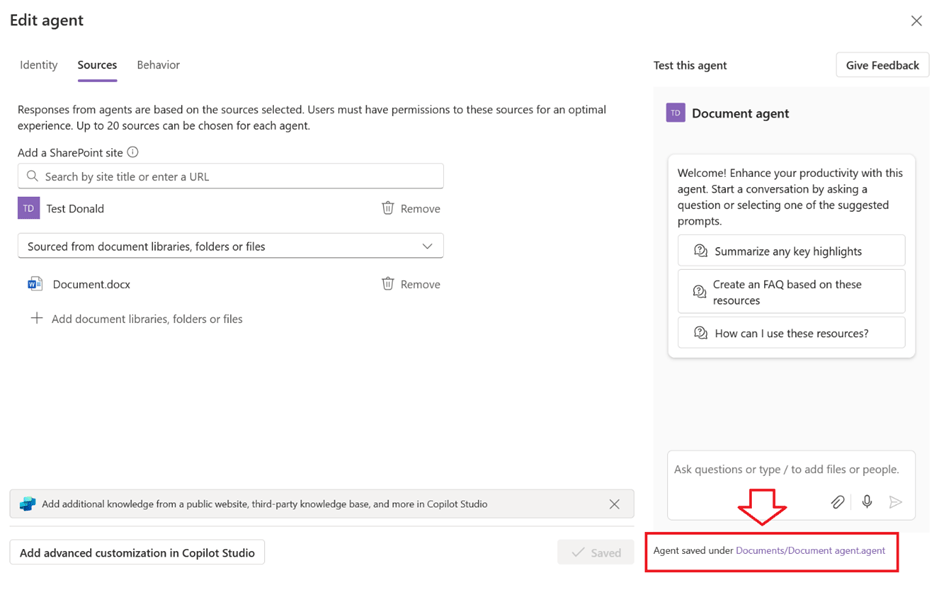
The Edit popup shows the location of the saved agent:

Navigating the link will lead to the location of the associated .agent file:

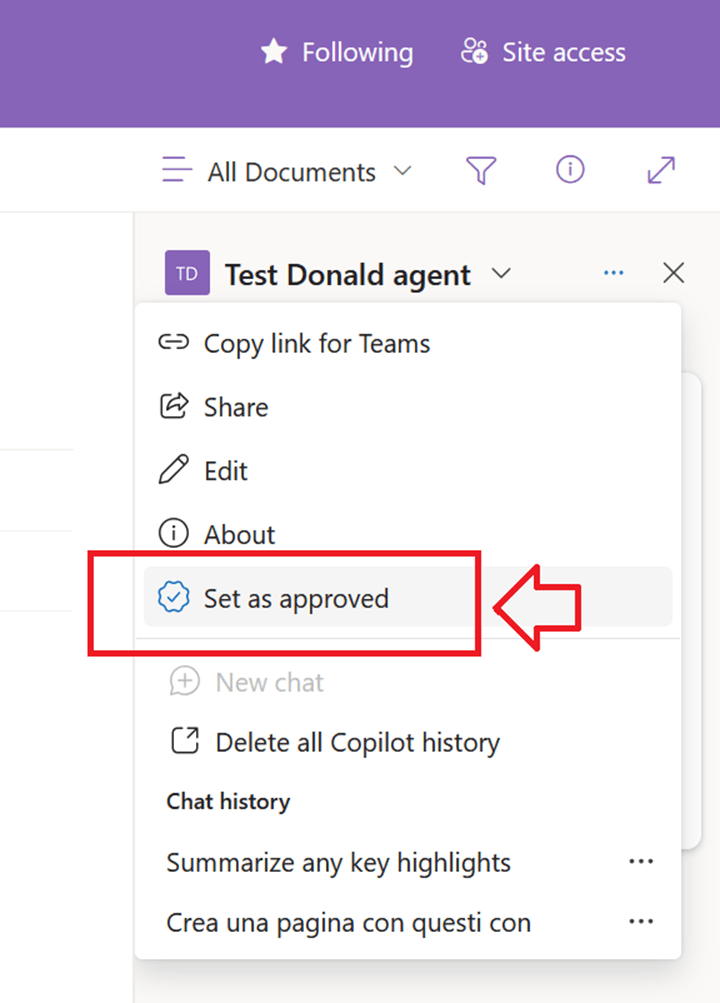
The new agent thus created is Personal and as such only accessible by the user who created it. When the site owner approves it, it becomes Published (Approved) at the site level and therefore accessible to the other (licensed) users of the site:

Once the agent has been approved, the relevant file is physically moved automatically by SharePoint to Site Assets > Copilots > Approved:

The newly approved agent can now be set as the site’s default agent:

There can only be one default agent for any given site:

Back to the question, then: can I configure a SharePoint Agent once and then have it as the site default agent on all sites?

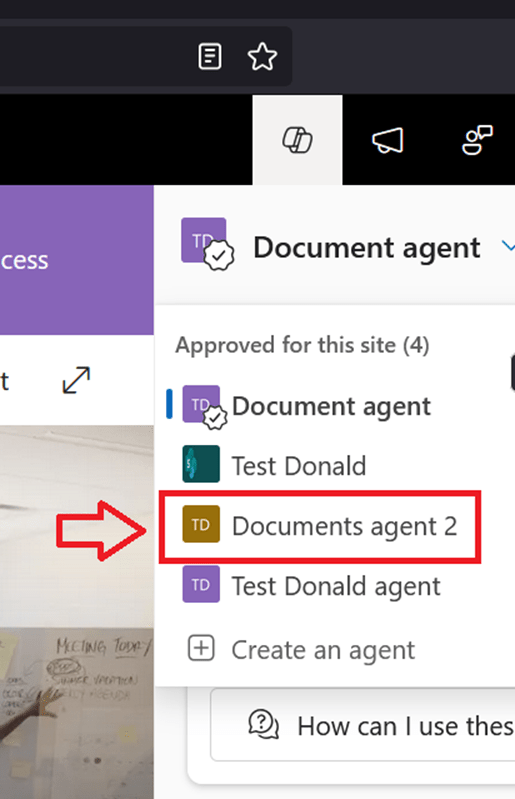
To answer the question, I have created a second site collection called ‘Test Donald 2’, thus a Documents Agent 2, which has both sites (Test Donald and Test Donald 2) as sources:

I then saved it, approved it, and set it as the default for Test Donald 2:

The next step then was to copy the relevant .agent file from Test Donald 2 to Test Donald:

The agent just copied appears correctly in the list as an approved agent on the Test Donald site:

And it is also possible to select it and set it as site default agent:

Conclusions

The answer then is Yes, you can have a default agent that is always the same on all SharePoint sites, provided you accept the following limitations:

  • 20-source limitation (inherent limitation of SharePoint Agents, at least for now).
  • Customisation in Copilot Studio not yet available.
  • Manual copying of the .agent file and manual approval as default agent.

The copying of the .agent file could be automated with a Power Automate flow associated with a provisioning process. However, approving it as the default agent currently is not possible via API.

The Modern Intranet – Part 2: The role of SharePoint

Introduction

The role of SharePoint in Microsoft 365 has evolved compared to its previous role in the “on-premises era.” In the past, SharePoint on-premises served as a comprehensive platform for content management, intranet portals, application development, search centres, collaboration, and community management.

Teams and Viva taking the lead

Nowadays, Microsoft Teams has taken over as the primary collaboration platform, while SharePoint has transitioned into a Content Storage provider role. A SharePoint team created within a Microsoft Teams team can be used as-is without modifying its structure or making customisations. Documents stored in SharePoint can be accessed from Microsoft Teams, eliminating the need to access SharePoint directly in most cases.

Microsoft Viva Engage has assumed the role of the community management platform. It seamlessly integrates with Microsoft Teams, requiring minimal interaction with SharePoint.

The Power Platform has become the go-to solution for rapidly developing line-of-business applications in the Modern Workplace. It integrates various data sources, not limited to SharePoint. For more complex scenarios, developers can leverage the Teams Toolkit, where SharePoint Framework (SPFx) is just one of the available options.

The Search System is now integrated across all Microsoft 365 systems, extending beyond SharePoint.

So, what is the actual role of SharePoint in Microsoft 365?

​ Well, SharePoint in Microsoft 365 still fulfils two fundamental roles:​

  • Collaboration: SharePoint Online offers capabilities for document management, authoring and co-authoring, and sharing documents among organisational and external users.​
  • Publishing: SharePoint Online serves as the primary building block for creating a publishing portal that delivers content, news, policies and procedures, search functionality, user profiles, links, and other relevant information to a broader audience, ideally encompassing the entire organisation or specific departments. ​

Furthermore, SharePoint Online serves as a foundational layer for enhancing the capabilities of Microsoft Teams:​

  • Providing content storage and document management capabilities within Microsoft Teams.​
  • Allowing for the integration of the Modern Intranet within Microsoft Teams through Microsoft Viva.

​Coming up next

The next blog post in the series will focus on SharePoint Online as the foundation for creating a publishing portal.

Part 3 – The Publishing Portal >

Get your Modern Workplace ready for Copilot

Exciting news from Microsoft! They have just unveiled Copilot, a groundbreaking generative AI tool that is about to transform the way we work and boost personal productivity. But how exactly does Copilot fit into the comprehensive Microsoft 365 product suite? What does this mean for your company’s data and security? And most importantly, how can you ensure a smooth rollout that aligns with your organization’s unique business and technical needs?

Exciting news from Microsoft! They have just unveiled Copilot, a groundbreaking generative AI tool that is about to transform the way we work and boost personal productivity. But how exactly does Copilot fit into the comprehensive Microsoft 365 product suite? What does this mean for your company’s data and security? And most importantly, how can you ensure a smooth rollout that aligns with your organization’s unique business and technical needs?…

Read my full article on Codec Ireland’s blog

The Modern Intranet – Part 1: Unleashing Collaboration and Productivity

Let’s dive into the world of modern workplace intranets and explore how they empower organisations to harness the full potential of their workforce, data and business processes, regardless of their location.

Introduction

In today’s evolving work landscape, where hybrid and remote working have become the new normal, effective collaboration, information sharing and communication are key to fostering productivity and innovation. Organisations today are seeking robust and secure solutions to thrive in this evolving work landscape, to connect their teams, streamline business processes and cultivate a collaborative work culture, at the same time making sure their company data are secure and properly governed. In this blog post, we will dive into the world of modern workplace intranets and explore how they empower organisations to harness the full potential of their workforce, data and business processes, regardless of their location.

Key features and benefits of a Modern Intranet powered by Microsoft 365 suite of products

Seamless Communication and Collaboration

A Modern Intranet serves as a centralised hub for employees, ensuring seamless communication and collaboration. Integrating together Microsoft Teams, SharePoint Online, and Microsoft Viva, employees can easily connect with colleagues, share content, access company’s news and information, and collaborate together on projects in real-time. Whether in the office or working remotely, the Modern Intranet brings everyone together in a digital workplace, fostering a sense of unity. With shared calendars, task management, and instant messaging capabilities, teams can collaborate efficiently, breaking down silos and improving cross-functional communication.

Efficient Document Management

Document management lies at the heart of a Modern Intranet. Microsoft 365 provides robust document storage and sharing capabilities through SharePoint Online, allowing users to collaborate on documents simultaneously and share them internally in the organisation as well as externally. Version control and granular access controls ensure that information is managed securely and is always up to date. Additionally, powerful search functionalities and metadata tagging make it easy to locate documents quickly, enhancing productivity and reducing time wasted searching for critical information.

Personalised and Targeted Content

A Modern Intranet should not only serve as a repository of information but also provide personalized and targeted content to its users. Microsoft 365 leverages AI and machine learning to deliver relevant content to employees based on their roles, departments, or interests, enhancing productivity and reducing time spent searching for resources:

  • SharePoint Online can deliver personalised news feeds and powerful search capabilities.
  • SharePoint Syntex automatically processes and extracts information from documents, allowing users to classify, organise, and find relevant content more efficiently. It streamlines content management and improves the search experience.
  • Viva Topics creates a knowledge graph that connects and surfaces relevant information across various sources, using AI to identify topics, establish relationships, and generate topic pages that consolidate related content, providing users with a comprehensive understanding of a subject.

Business Process Optimisation

Microsoft 365 leverages the powerful combination of Power Platform, Microsoft Teams, and Dataverse to streamline and enhance organisational workflows:

  • The Power Platform empowers users to create custom applications, automate repetitive tasks, and gain valuable insights through data visualisation.
  • Microsoft Teams serves as a centralized communication hub, fostering seamless collaboration and real-time interaction among team members.
  • Additionally, Dataverse serves as a secure and scalable data storage platform, ensuring data integrity and facilitating integration across various Microsoft 365 applications.

By leveraging these tools, businesses can optimise their processes, improve productivity, and achieve enhanced operational efficiency.

Data Governance & Control

Maintaining the security of sensitive company information is crucial, especially when working in a hybrid or remote setting. SharePoint Online offers secure file sharing and content storage capabilities. With its granular permissions and access controls, organisations can ensure that only authorized personnel can view, edit, or share sensitive documents, mitigating the risk of data breaches. With Microsoft Purview, organisations can gain comprehensive insights into their data landscape, enabling them to discover, classify, and monitor data across various sources. Microsoft 365 labels further enhance data governance by allowing administrators to define policies and rules for data classification, retention, and protection. This integrated approach empowers businesses to establish a structured and compliant environment, ensuring data is appropriately governed, secured, and leveraged to drive informed decision-making.

Employee Engagement and Company Culture

Maintaining a strong company culture and employee engagement is vital, even more in a hybrid or remote work environment. A Modern Intranet fosters employee engagement through various features. Viva Engage, the enterprise social networking platform, enables employees to connect, share ideas, and celebrate achievements. It also serves as a platform to recognize employee contributions, share company updates, and promote internal events, creating a sense of belonging and unity among team members.

Conclusions

The Modern Intranet is a game-changer for organisations looking to enhance internal collaboration, streamline business processes, and drive employee engagement. As the world continues to embrace remote and mobile work, a modern workplace intranet equips organizations with the necessary infrastructure to adapt and thrive in the modern business landscape.

Coming up next

In the upcoming posts of this series, I will walk you through the entire process of building a Modern Intranet using the Microsoft suite of products. We’ll start from the conceptual and architectural phases and progress to the implementation and roll-out stages. Throughout this series, we will utilise the suite of tools mentioned in this post, while also drawing upon real-world examples and case studies based on my extensive experience as a Microsoft technologies consultant.